Challenges Faced
Students juggled five different apps just to stay in touch with classmates and teachers. Nothing felt connected. Nothing felt safe either.

Every campus has conversations that never find a proper home. KonnectX fixed that. This social networking app development case study follows how scattered student and teacher voices turned into one trusted platform where people actually connect, learn, and grow.
View ResultsOur client runs an education-focused startup based in India, building tools that bring students and teachers closer together digitally.
Students juggled five different apps just to stay in touch with classmates and teachers. Nothing felt connected. Nothing felt safe either.
Build one verified, role-based social platform for students and educators. Add real engagement tools, safe connections, and opportunities for jobs and events.
Primary: College and university students are looking for a trusted space to network, learn, and discover opportunities tied to their field.
Secondary: Teachers, professors, and academic institutions want a professional way to engage students beyond the classroom.
We spoke to real students and teachers before writing a single line of code. Their frustrations shaped everything that followed.
Occupation: Final year engineering student, part-time content intern.
Pain Points: Manages five apps for college life. No single place to network, learn, or find internships.
Goals: Wants one verified platform to connect with peers, mentors, and relevant job openings.
Occupation: Assistant professor and academic content creator.
Pain Points: No professional space to share resources or host events without email chains and WhatsApp groups.
Goals: Wants to build a teaching reputation, host events, and reach students in an organized, respectful way.
Students and teachers both wanted trust before features. Verification, safety, and relevance mattered more to them than flashy design.
Production
App launched 3 months back
9 Active Members
Across design, development, and QA teams
6 Months Duration
From concept to production launch
5 of 5 Completed
All major milestones achieved successfully
The build moved through six clear phases, each one grounded in research before a single screen was designed.
We started with workshops alongside the client's founding team. Goals, must-have features, and constraints got mapped out early, before design work began.
CompletedInterviews and surveys with students and faculty shaped early personas. This stage gave us the real pain points behind the product brief.
CompletedWe sorted every requested feature into must-have, should-have, and later phases. This kept the first release focused instead of bloated.
CompletedWireframes turned into clickable prototypes. Students and teachers tested flows early, which caught confusing navigation before development even started.
CompletedFrontend and backend teams worked in parallel sprints. APIs, databases, and mobile screens came together under continuous integration checks.
CompletedA closed group of students and teachers used the app first. Their feedback shaped the final round of fixes before public launch.
CompletedA focused, cross-functional team handled design, development, and quality checks from day one through launch.
We didn't just build features. We built a system where trust, roles, and relevance worked together from the ground up.
Students, teachers, and admins each got tailored experiences. Permissions, feed content, and tools changed based on who was logged in.
Every module, from feed to marketplace, was mapped against user roles first. This stopped feature creep and kept navigation simple.
Verification checks, reporting tools, and moderation dashboards got built early, not bolted on later. Safety shaped the product from the start.
We picked Sora for headings and Inter for body text. Both stay legible on small screens while giving the app a modern, academic feel.
Headings & Titles
48px - 32px
Subheadings
28px - 24px
Body Text
18px - 16px
Captions & Labels
14px - 12px
Deep indigo carries trust and focus, paired with a warm orange accent for energy. Neutral grays keep long feed sessions easy on the eyes.
#FD5301
Main brand color, CTAs, active states
#8EBB52
Hover states, emphasis elements
#13AC67
Eco-friendly indicators, confirmations
Three connected experiences power KonnectX, each built around what that user actually needs day to day.
Android iOS Web
Students get a personalized feed, connection requests, marketplace listings, job boards, and event RSVPs, all inside one verified profile.
Android iOS
Teachers can post academic content, host events, message students within set boundaries, and track engagement without switching between five tools.
Web Panel
Admins verify accounts, moderate reported content, manage institution pages, and review platform analytics from a single control panel.
The stack balanced speed to market with long-term scalability, using proven frameworks instead of chasing trends for their own sake.
These problems stood out during development, each tied to scale, speed, or the sheer volume of content users generate.
With thousands of posts flowing in daily, a plain chronological feed buries relevant content fast. Relevance had to be earned, not assumed.
We combined collaborative filtering with content-based signals and real-time engagement data. The feed adjusts per user instead of showing everyone the same list.
Messaging, notifications, and live updates needed to fire instantly across thousands of concurrent sessions without slowing down the rest of the app.
Apache Kafka handles event queues for messages, notifications, and feed updates. Services stay decoupled, so one slow process never blocks another.
Photos, videos, and reels uploaded from thousands of devices needed fast processing and quick delivery, regardless of file size or connection speed.
Uploaded media runs through automated cloud transcoding into multiple resolutions. A CDN then serves the right version based on each user's connection.
The system was built in independent, replaceable pieces rather than one large monolith that could slow future growth.
Feed, messaging, marketplace, and jobs each run as separate services. Any single module can scale or update without touching the rest of the app.
A dedicated ranking service pulls engagement data, academic interests, and connection history to shape what each student or teacher actually sees first.
Role-based access control governs what students, teachers, and admins can view or edit, backed by OTP verification at every account entry point.
KonnectX combines social networking with academic and career tools, all wrapped inside a role-aware, verified environment.
Every account starts with phone-based OTP verification. Students and teachers get different onboarding paths based on their selected role.
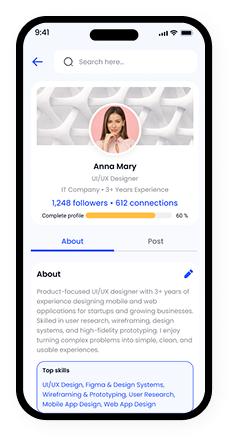
Individuals get personal profiles, while institutions and organizations get dedicated business pages for events, job listings, and announcements.
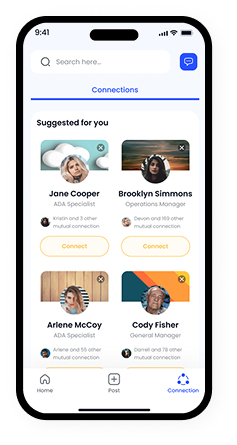
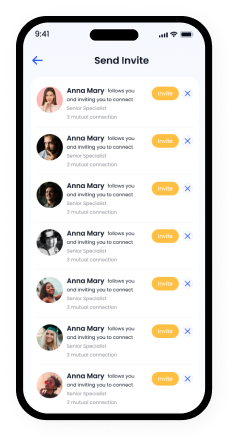
Public profiles can be followed freely, while private accounts require a connection request. This mirrors real academic relationships better than a simple follow model.
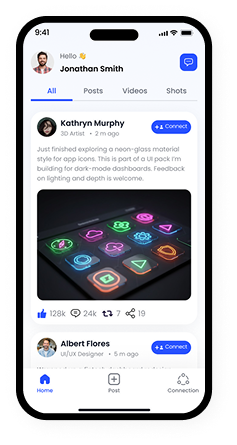
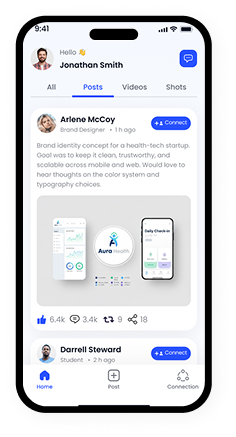
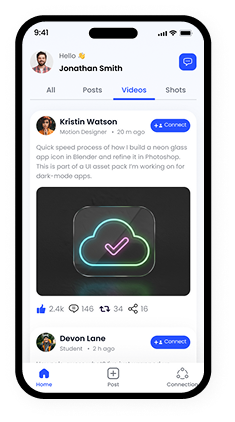
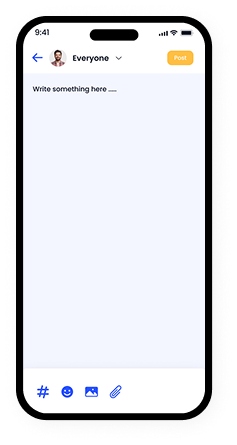
Users post text updates, images, short videos, and reels, all ranked by the recommendation engine based on relevance rather than posting time alone.
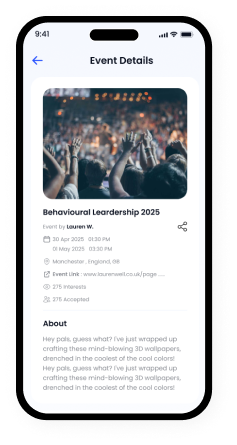
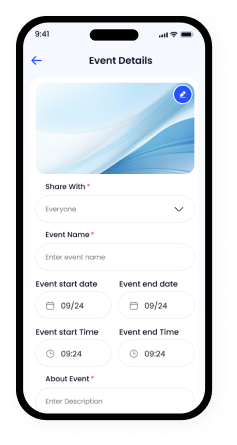
Teachers and institutions create webinars, seminars, and workshops directly inside the app. Students RSVP, get reminders, and join without leaving the platform.
Students list textbooks, gadgets, and services, while recruiters and institutions post internships and jobs matched to academic background and interests.
Content gets filtered by academic level, so a first-year student and a postgraduate researcher see entirely different, more relevant feed content.
Beyond one-off events, academic clubs and study groups can run recurring sessions, mentorship circles, and peer-led discussions right inside their own community space.
Post-launch, the client saw strong early adoption across partner institutions, with steady daily engagement and low churn during the first few months live.
Launch was only the starting point. Our team stayed engaged to keep the platform stable, secure, and improving over time.
Server load, API response times, and crash reports get tracked continuously, with fixes rolled out before small issues turn into user complaints.
New feature requests from students and teachers feed directly into quarterly release planning, keeping the product aligned with actual user behavior.
A dedicated moderation dashboard flags reported content fast, while a support queue handles account issues and verification disputes within set response times.
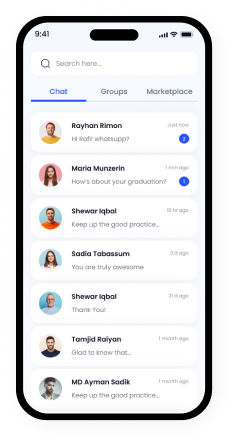
A look at the KonnectX interface across student, teacher, and admin experiences, from onboarding screens to the personalized feed.

Digital healthcare consultation platform connecting patients with specialists through secure video consultations and appointment management.
View Case Study
Automated recruitment and workforce management system with AI-powered candidate matching and streamlined hiring workflows.
View Case Study
Modern fashion retail e-commerce solution with personalized recommendations, virtual try-on, and seamless checkout experience.
View Case StudyFAQs – Social Networking App Development Case Study
Social networking app development is the process of designing, building, and launching a platform where people connect, share content, and interact in real time. It covers everything from user profiles and feeds to messaging, notifications, and moderation tools, all built to support genuine, ongoing engagement between users.
Costs typically range between $30,000 and $250,000, depending on feature complexity, platforms covered, and backend infrastructure. A basic MVP sits at the lower end, while a full-featured app with real-time feeds, marketplace tools, and AI-driven recommendations pushes closer to the higher end of that range.
Development timelines usually run from 3 to 9 months. Simpler apps with core social features can launch faster, while platforms with role-based ecosystems, marketplaces, or custom recommendation engines, like KonnectX, take longer due to added testing and integration work.
Core features include user profiles, a content feed, messaging, notifications, and search. Beyond that, most successful apps also need connection or follow systems, content moderation tools, media upload support, and some form of personalization to keep users returning instead of scrolling past irrelevant content.
A common and reliable combination includes React Native for mobile apps, React.js for web panels, and Node.js for backend services. This stack supports real-time features well, shares code across platforms, and scales comfortably as user numbers and content volume grow over time.
Scalability comes from modular, microservice-based architecture, event-driven systems like Kafka for real-time actions, and CDN-backed media delivery. Splitting the platform into independent services, rather than one large codebase, lets teams scale individual modules like feed or messaging without affecting the rest of the app.
Privacy and security rely on encrypted data storage, role-based access control, and OTP-based authentication at every entry point. Regular security audits, clear data permission settings, and active content moderation also help protect users while keeping the platform compliant with data protection regulations.
Let's transform your vision into a powerful digital solution that drives real results
Start Your Project Today